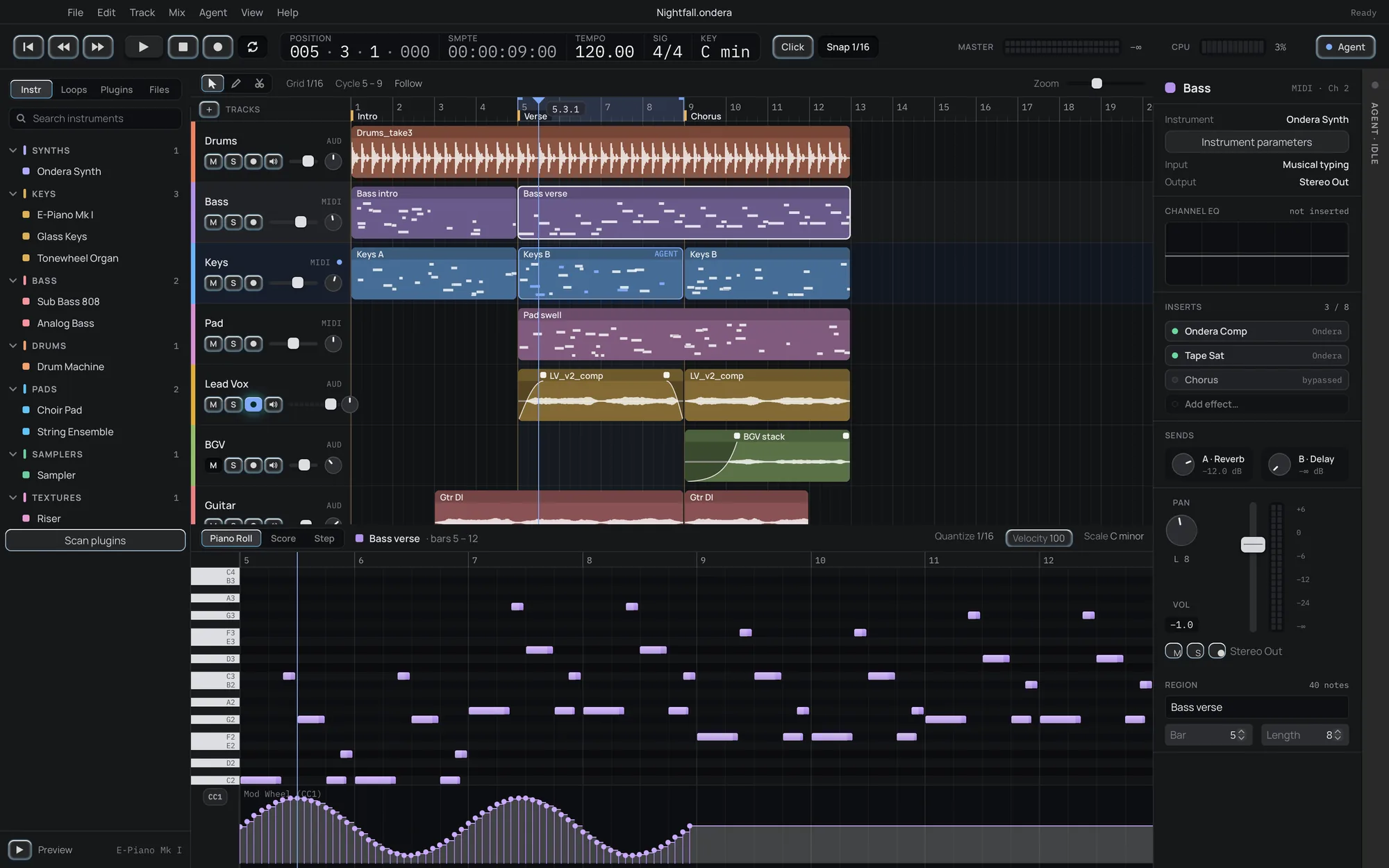
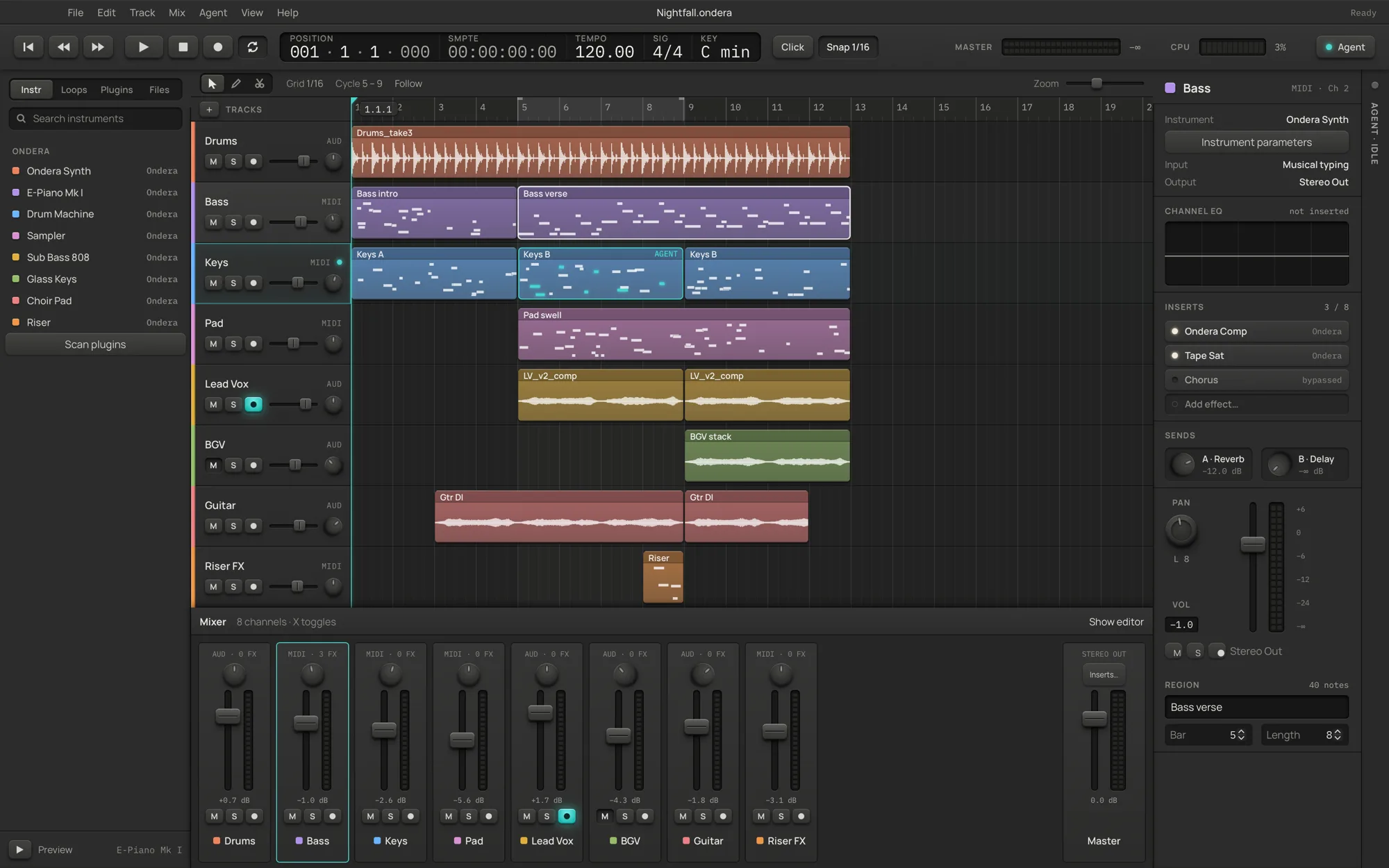
Ondera is a complete DAW: record, arrange, edit MIDI, mix on a real mixer and export stems, with 34 stock plugins and your own VST3, CLAP and Audio Units. When you would rather not quantise forty notes by hand, ask the built-in agent. It works on the same session, and every edit it makes is one undo away.
Version 0.7 · MIT licensed · no account, no subscription, no telemetry
Untitled session — OnderaInteractive web preview
001.01.00100:00:00:00
Tempo120.00
Sig4 / 4
CPU
A browser sketch of the window: Space moves the playhead and M mutes a track. The real thing is below.
The actual window
Not a mock-up. This is what you download.
Arrange and edit. Real decoded waveforms, a piano roll with score and step views, and the channel strip always in reach.Mix. Press X for every channel side by side with live meters. The Aero theme is shown; a graphite one ships too.
Features
Everything between an idea and a bounced master.
Record and arrange
Arm a track and watch the microphone level before you sing. A count-in clicks you in while the input opens, so the first word is never clipped. Cycle ranges, split, trim, duplicate, copy and paste, snap from whole bars to 1/64. Drop audio (WAV, AIFF, FLAC, MP3, Ogg, AAC, CAF, even 5.1) or a MIDI file straight onto the window.
Three MIDI editors
Piano roll, score and step views on the same notes. Quantise, humanise, legato, velocity ramps, fit to scale and transpose, from the menu or ⌥↑⌥↓.
A real mixer
Fader, pan, mute, solo, arm and a live meter per channel, eight inserts a strip, reverb and delay buses, a master chain and drawn automation for any parameter.
34 stock plugins, sorted by sound
Eleven instruments, from a polysynth, an electric piano and a tonewheel organ to an 808, an analog bass and a string ensemble. Twenty-three effects: compressor, EQ, tape, reverb, echo, de-esser, flanger, pitch shifter, lo-fi and a pump that ducks on the beat without sidechain routing. The browser files every plugin you own, theirs and ours, in colour-coded sound folders with favourites and recents, and each stock panel draws what it is doing from the same maths as the audio.
Your plugins too
Hosts VST3, CLAP and macOS Audio Units, scanned in a separate process so one bad plugin cannot take the app down. State is saved inside the project.
Rhythm Lab and takes
Generate Euclidean grooves you can audition before committing. Keep up to eight protected variations of a session and flip between them A/B.
Export that fits the job
Stereo WAV or AIFF up to 96 kHz, 32-bit float WAV, aligned track stems, selected ranges and 960-PPQ MIDI. Import MIDI files the same way.
Fast hands
⌘P opens a command palette with every command by name. Single-key transport, tools and track toggles, and a shortcut sheet generated from the real bindings.
Hard to lose work
Rolling recovery snapshots, a recovered-take rescue for interrupted recordings, saves that never replace a good file with a bad one, and Ed25519-signed updates.
Every plugin you own is filed by what it does. One colour per sound family, from the browser to the front panel.
Synths
Keys
Bass
Drums
Pads
Samplers
Textures
Dynamics
EQ & Filter
Distortion
Modulation
Space & Time
Pitch
Utility
Switching
What moving over actually looks like.
No DAW reads another DAW’s project files, and Ondera does not pretend to. Here is what comes with you, what is better on this side, and what is not here yet, so you can decide with the facts.
Comes with you
Your plugins. VST3 and CLAP on every platform, Audio Units on macOS.
Your audio. Bounce stems from the old project and drop them in. They land as clips on audio tracks.
Your MIDI. Standard MIDI files import as regions and export back out.
Your habits.Space plays, R records, C cycles, ⌘T splits, ⌘D duplicates, MS mute and solo.
Better on this side
Free, for good. MIT licensed. No tiers, no dongle, no account, no track limit.
Linux included. Every release ships Linux builds from the same pipeline and tests as macOS and Windows.
An agent that can actually edit. Not a chatbot beside the DAW: it runs the DAW’s own commands, in your undo history.
Scriptable end to end. 150 commands from a CLI or any MCP client, answered in under a millisecond each, or hundreds at once as a single undo step. Render a project headless with one line.
A file you can read. Projects are plain JSON with the audio embedded, not an opaque binary.
Not here yet
Time stretching and warping.
Take comping and clip fades.
Tempo changes inside a song.
User-defined buses and groups beyond the two sends.
MP3 or FLAC export, VST2 and AAX.
If your work depends on one of these, keep your current DAW for that job and try Ondera for writing and arranging.
Agent
Ask for the edit. Keep the undo.
The agent panel streams its reply while it works and shows one card per command it runs. It uses the model you already pay for: Codex or Claude Code from their CLIs, an Anthropic or OpenAI key, or any OpenAI-compatible endpoint, including a local one. Nothing leaves your machine unless you connect a provider.
Slash commands for the common asks./beat, /chords, /humanize, /mix, /arrange, /diagnose and more, or plain language.
Undo from here. The Activity tab lists every change the agent made. Roll back to any point, or redo forward again.
On a leash you hold. Permissions gate file access, transport, replacing the session, settings and quitting. Off means off, for the panel and for MCP clients alike.
Command layer
One command layer. Four clients. None of them privileged.
The desktop window, command-line tool, MCP server and built-in agent share 150 validated commands for sessions, transport, tracks, notes, plugins, presets, automation, settings, exports and the interface itself. Agent edits use the same undo history as manual edits. Native dialogs and plugin windows remain interface controls.
GUI
Click it
BGVAudio
The window’s button dispatches track.setMute through the command store. Persistent edits share the session’s undo and redo history.
MCP tools expose the same parameter schemas, plus prompts and resources for settings, plugins and presets. The built-in agent uses the same tools with Codex CLI, Claude Code CLI, an Anthropic or OpenAI key or any OpenAI-compatible endpoint; prompts and tool results go to the provider you choose.
These examples reflect the browser preview’s store. Mute BGV above and watch the displayed values follow.
Themes
Three looks. Dark and light. Same instrument.
Pick the one you want to stare at for six hours. Every theme is computed, not painted: one neutral ramp in OKLCH, one accent, and text contrast that is tested on every surface in both modes. This page is wearing the same tokens as the app, so choose one and watch everything follow, the preview above included.
Material system
The same controls, re-lit by the theme.
Every control is built from a handful of material recipes: raised, pressed, lit, groove, well, knob, fader cap. A theme does not redraw them, it re-lights them. Skeuomorphic gives each one a specular edge, a darkening face, a contact line and a soft drop. Modern keeps only the line. Aero turns the face into a lens. Try the rack, then change the theme.
Gain
-6.0 dB
drag up / down
Level
+60-6-12-24-∞
drag the cap
States
every recipe lives in one tokens file
Recipe
1Rampone neutral hue, surfaces placed by OKLCH lightness
2Lighthighlight and shade strengths per mode, not per control
3Accentone colour for focus, playhead and the agent
4Prooftext contrast tested on every surface, six times
Architecture
API first. The window is just one client.
Ondera’s desktop window, CLI, MCP server and built-in agent share a Rust command registry and session store. Since 0.4 the window is a Tauri 2 shell with a React renderer in the system WebView; the session, undo history, plugins and the real-time audio callback stay in Rust, and no audio runs in JavaScript.
Desktop windowTauri 2 · React renderer
CLIgenerated from the registry
MCP servergenerated from the registry
Built-in agentCodex · Claude Code · API keys
ondera-enginecommand registry · session store · model · undo · dispatch(command)Rust session model · validated edits · shared history
prepared graphs · bounded queues
Audio enginenative Rust DSP and device audio34 stock plugins on the Rust plugin SDK · native, CLAP, VST3 and macOS Audio Units
Edits go through the store. The interface keeps hover and drag previews local. Persistent changes dispatch commands and participate in undo.
One shared registry. CLI help, MCP tool schemas and the agent’s tool list come from the same command definitions. Compact queries inspect the arrangement without returning opaque plugin state.
Agents on a leash. Permissions gate file operations, transport, replacing the session, settings and application control for the panel, MCP clients and --agent. Every agent edit can be undone from the Activity tab.
Consistent materials. The desktop interface keeps its tokens and material recipes in one theme module. This site preserves the same palette and recipes.
Roadmap
Where it is, honestly.
01
Song workflowRecord audio and MIDI, arrange regions, edit notes, automate parameters, mix and export stereo WAV or track stems. Embedded-audio projects, MIDI interchange and recovery copies.
0.2
02
Plugins34 stock plugins written on the Rust plugin SDK and loaded through the same frozen C ABI as third-party libraries. One command scaffolds a new plugin with a test bench; a plugin that panics is contained instead of taking the session down. Alongside them, plus external CLAP, VST3 and macOS Audio Units. Factory and user presets.
0.3
03
Built-in agent, Settings, signed updatesA conversation with one card per tool call and an undo point on every edit. Codex CLI, Claude Code CLI, Anthropic or OpenAI keys or any compatible endpoint. Full CLI and MCP parity across the command registry. Ed25519-signed releases verified by the updater.
0.3
04
Tauri interfaceThe window moves to Tauri 2 with a React renderer, keeping the same layout and materials. Real decoded waveforms, native dialogs, no Node at runtime. The engine, undo history and audio callback are unchanged Rust.
0.4
05
Mixer, palette, faster editingA mixer with a live meter on every channel, a command palette, copy and paste, track duplication, transpose keys, audio files dropped from the file manager, and a streaming agent with slash commands, Rhythm Lab, takes and two themes.
0.6
06
Recording, sound folders, a faster bridgeA count-in and a microphone meter, every plugin filed by sound with favourites and recents, ten new stock plugins, contained plugin panics and a plugin scaffold, AIFF export and surround import, 150 commands answered between frames, an agent that shows its work in plain words, and motion in every theme.
0.7 · now
07
Next, and current limitsClip fades and gain, time stretching, comping, tempo changes and user buses are not built yet. No VST2 or AAX. External plugin editors are macOS-only. Windows and Linux windows are built and tested in CI but not yet checked by hand. Packages are ad-hoc signed, not notarized; Windows binaries are unsigned.
next
FAQ
Fair questions.
Is it really free? What is the catch?
Yes. Ondera is MIT licensed, with no paid tier, account or track limit. The agent uses whichever model provider you connect, and that provider may charge you; the DAW works fully without one.
Do I have to use the AI?
No. The agent stays idle and nothing is sent anywhere until you connect a provider and send a prompt. Every feature on this page except the agent works offline.
Will my plugins work?
VST3 and CLAP plugins load on macOS, Windows and Linux, and Audio Units on macOS, as long as they match your processor architecture. VST2 and AAX are not supported. Native plugin editor windows currently open on macOS only; elsewhere you get Ondera’s generic parameter panel.
Can I open my Ableton, Logic or FL Studio projects?
No, and no other DAW can either. Export stems and MIDI from the old project and import them. It takes a few minutes per song.
macOS says the app cannot be opened.
Builds are ad-hoc signed, not notarized by Apple yet. Right-click the app, choose Open, then Open again. You only need to do it once.
Is it stable enough for real work?
It is a young 0.x project. Each release must pass the engine tests and a scripted full-song session (record, edit, save, reopen, export) on all four platforms before it ships, and recovery snapshots run in the background. Keep backups, as with any DAW.
What can the agent touch?
Only what the permission switches in Settings allow. By default it can edit the session, import and export files and run the transport; replacing the session, changing settings and controlling the app are off until you turn them on. Each is its own switch. Whatever it changes is in your undo history.
Download Ondera 0.7
Free and MIT licensed. Archives include the ondera-cli and ondera-mcp companions, and the app updates itself from signed releases.